
Yes, the SkyTrak+ is absolutely suitable for beginners because it gives clear feedback, simple ball placement, and an easy layout that never overwhelms you.
What surprised me most was how beginner friendly it feels once you actually put shots through it. The larger hitting zone, dependable shot tracking, and quick setup make practice calm instead of stressful, which is the one thing new golfers need when they are trying to build a consistent swing.
The SkyTrak+ currently sells for $1,995, and even though it costs more than the original SkyTrak, the added ease of use and beginner focused tools make the upgrade feel justified the moment you start practicing.

Why SkyTrak+ Works So Well for Beginners
SkyTrak+ checks a lot of boxes that matter to newer golfers who want something easy to set up, simple to understand, and reliable enough to learn on without feeling lost.
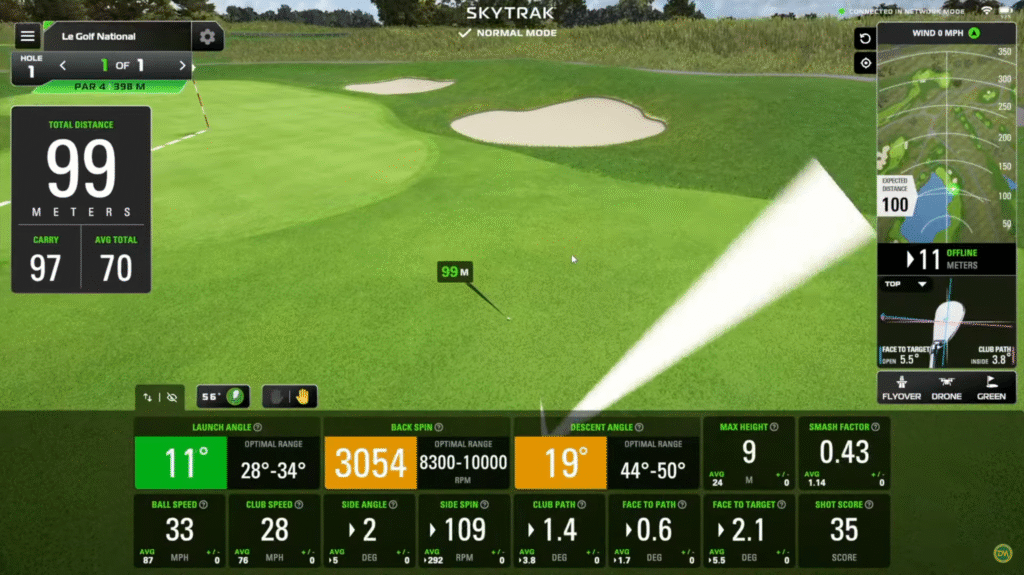
The first thing beginners notice is how easy the SkyTrak app is to use. The layout is clean and the practice modes guide you without throwing too much at you. You get the basics like carry distance, ball speed, launch angle, spin, and shape, and the numbers appear clearly enough that even total beginners start to see patterns in their swing.
Simple ball placement is another big plus. A red laser dot shows exactly where to place the ball so there is no guessing. You set the ball on the dot and hit, and the device does the rest. For new golfers, removing complexity makes a massive difference because you can focus on making a good swing instead of worrying whether the device is lined up correctly.
The accuracy feels consistent enough to trust as you learn. Data like carry distance, spin, and ball speed tends to stay within believable ranges. When you are trying to improve contact or dial in wedges, having honest feedback matters more than anything else. It removes the confusion and lets you see what your swing is actually doing.
Beginner-Friendly Design and Setup
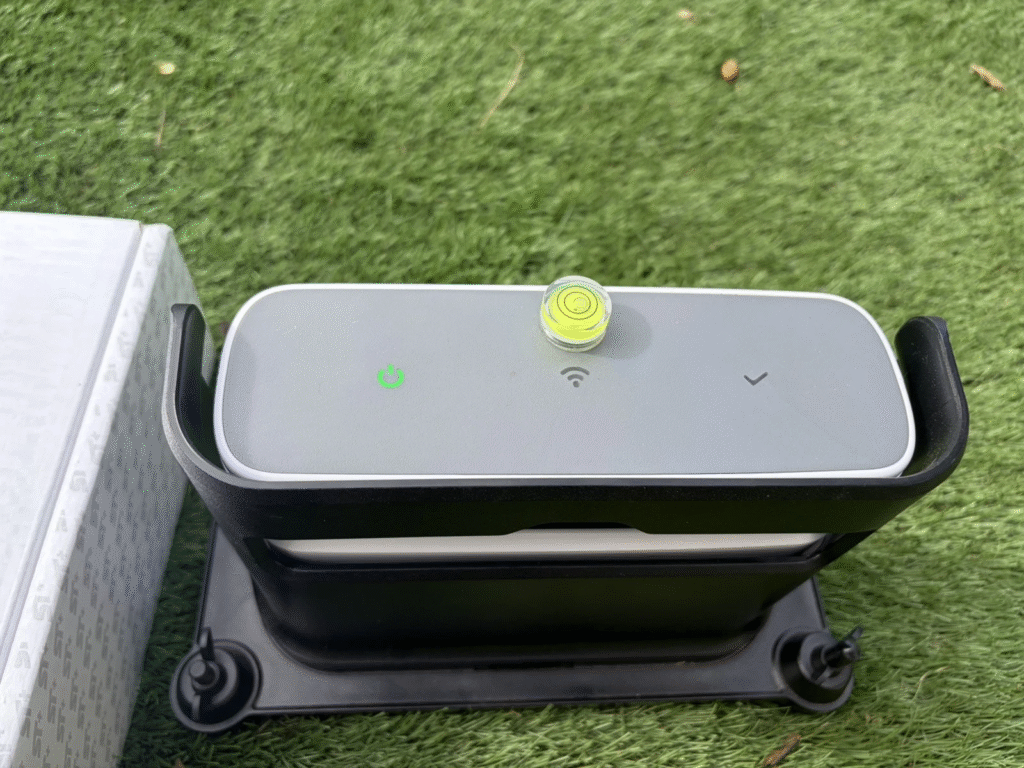
The SkyTrak+ is one of the easiest launch monitors to set up in a home or garage space. You connect through WiFi, place the unit beside the ball, and set the ball on the laser. It only takes a few minutes once you know where everything goes. This helps beginners get into a practice rhythm without fumbling around every time they want to hit a few shots.
The hitting area is noticeably larger than the original SkyTrak. The extra room means fewer misreads and less stress about perfect ball placement. New golfers miss the dot more often, so having more forgiveness makes a big difference in how smooth the session feels.
Minimal space is needed because the SkyTrak+ sits beside the ball instead of behind it. New golfers don’t always have ideal room dimensions, and the side-mounted design makes it work in garages, spare bedrooms, and smaller setups without needing a long runway behind the ball.
Quick connectivity also helps beginners stay consistent. You can run SkyTrak+ on PC, iOS, or Android, and switching between devices is straightforward. This flexibility means you can practice anywhere and keep your sessions simple.

Practice Tools That Make Learning Easier
SkyTrak+ includes several built-in features that are perfect for beginners because they explain your ball flight in a clean, visual way.
The Shot Optimizer shows how your launch, ball speed, spin, and club data stack up against ideal numbers. It uses a red, yellow, green scoring system that instantly tells beginners if a shot was solid or needs improvement.
Bag Mapping is helpful when you start learning real distances. Beginners rarely know how far they hit each club, so this tool builds a chart of your carry numbers across the bag. Understanding your yardages early on eliminates a lot of guesswork later.
Skills Assessments provide structured practice sessions that new golfers actually enjoy because you get a score and progress feedback. It feels like a game but still pushes you to improve.
The basic driving range mode comes free and gives beginners everything they need to get started. You don’t have to buy a subscription right away unless you want more advanced tools or course play.
Real-World Accuracy and Limitations for Beginners
The SkyTrak+ stays consistent enough for beginners to trust the numbers. Shot after shot, carry distance and ball speed stay close to what you feel you hit. This matters because you don’t want a launch monitor guessing or giving you random readings that confuse your progress.
Short putts are not the strongest part of the system. You can putt with the SkyTrak+, but readings under five feet can be inconsistent. Most beginners either skip the putting feature or treat it as a bonus rather than a main practice tool.
No stickers or special balls are needed. A clean white ball with a logo or a marked line gives the cameras and radar everything they need to track your shot. This is another beginner advantage because you don’t have to prep anything before you practice.
Calibration is simple if you ever notice shots not lining up with your feel. The system occasionally needs a quick alignment check, and the built-in guide makes the process easy for new users.
The recommended distance from your impact screen is around ten to twelve feet. This is mostly for safety and ball return. You can shorten it slightly, but beginners will want at least ten feet so everything stays comfortable.
A Few Things Beginners Should Know Up Front
The SkyTrak+ does require a subscription for full features. The basic range mode is free, but if you want advanced stats, game-improvement tools, or simulator courses, you will need to upgrade. Most beginners try the device first and upgrade once they feel ready.
SkyTrak+ performs best indoors. It can work outside, but direct sunlight and uneven turf can cause occasional inconsistencies. Most beginners practice indoors anyway, so this isn’t a major drawback.
A computer or tablet is required. You can use PC, iOS, or Android, but you must have a device to run the app and view your data. SkyTrak+ does not operate independently.
Final Thoughts: Is SkyTrak+ Great for Beginners?
From real experience, yes. SkyTrak+ is one of the most comfortable launch monitors for beginners to start on because it removes a lot of the friction that usually makes learning golf harder. The setup is easy, the ball placement is simple, the data is honest, and the practice tools guide you instead of overwhelming you.
If you are starting the game or trying to dial in a developing swing, SkyTrak+ gives you a clear pathway to improvement without requiring a perfect home setup or any complicated tech steps. It feels friendly, reliable, and built for people who want to improve without feeling lost in numbers.
This is one of the most beginner-ready launch monitors available right now, and it holds up as your skill grows.