
The Uneekor EYE XO2 is one of the most talked-about overhead launch monitors for indoor golf simulators right now. A lot of golfers see it as the “premium step-up move” when they want high-end accuracy, a larger hitting zone, and more advanced club and ball data than the first EYE XO. But here’s the real question:
Does the EYE XO2 deliver a noticeably better simulator experience, or is it just a bigger price with a few extra features?
After testing it in a home sim setup and comparing data side by side with the original EYE XO, GCQuad, and GCHawk, the EYE XO2 showed exactly where the upgrade pays off, and where expectations need to be realistic.

What the Uneekor EYE XO2 Is Built For
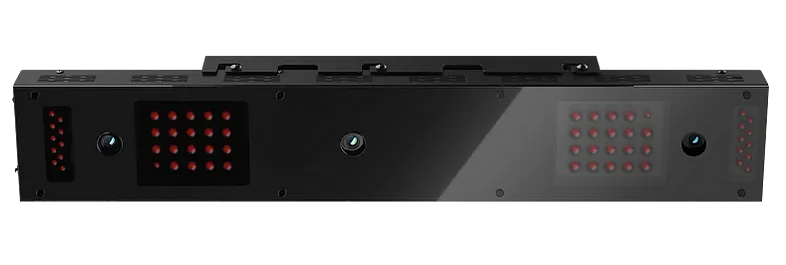
This is a ceiling-mounted overhead launch monitor designed for golfers who want a permanent, high-performance indoor golf simulator at home. It uses a triple-camera system to measure ball and club data directly, and the larger hitting zone makes it friendly for both right- and left-handed players without repositioning.
It’s built for golfers who want fast, reliable feedback, realistic practice sessions, and the ability to train with more than just a perfect fairway lie. When paired with the Trouble Mat, you can practice rough and bunker shots indoors, which makes sessions feel a lot closer to on-course play.

First Session Impressions
The first thing that stood out was how much more comfortable the hitting zone felt. I could move around naturally during wedge work, and the system still picked everything up cleanly. Seeing instant feedback pop up with ball data and the Club Optix impact video gave that “pro studio” feel right away.
I also stress-tested it with low-spin wedges and a few “bad swings” just to see how it handled mis-hits. Data stayed consistent, which gave me confidence early.
Unboxing the Uneekor EYE XO2
Uneekor includes what you need to get started without chasing extra pieces. Inside the box you’ll find:
- EYE XO2 launch monitor with a solid, durable build
- Ceiling mounting bracket with a built-in leveling tool
- Calibration chart and setup guide
- Trouble Mat inserts for rough and bunker practice
- Power and Ethernet cables for a direct PC connection
- Club stickers for deeper club data if you choose to use them
- A 3-month Champion Package trial
Everything is packed securely and labeled clearly, so setup doesn’t feel overwhelming when you start unboxing.
Setting Up the EYE XO2
Mounting and calibration matter a lot with this unit. It installs 9-10 feet above the hitting area and sits 3.5 feet in front of the tee. Make sure your space has at least a 9-foot ceiling and enough depth to swing freely. A home golf simulator setup that’s 10 feet wide, 9 feet high, and around 16 feet deep works well.
Once mounted and connected to your PC, the Uneekor Launcher walks you through updates and calibration. The bracket’s leveling tool makes it easier to get the correct angle the first time. It’s not plug-and-play like a floor unit, but once it’s up, you won’t need to touch it again. If you want a launch monitor you can move around, this isn’t the one — the EYE XO2 stays mounted.

Performance and Accuracy Indoors
Accuracy is the number one reason golfers buy this. The Uneekor EYE XO2 does not require marked balls for full ball data, which keeps the experience clean. The three high-speed infrared cameras pick up ball flight and club interaction instantly, and the data stays tight across the bag.
Here’s what it tracks consistently:
- Ball speed, launch angle, backspin, sidespin, and carry
- Club speed, face angle, attack angle, dynamic loft, and impact location
- Multi-surface reads when using the Trouble Mat
One thing I noticed quickly: the EYE XO2 handled high-spin wedge shots more accurately than the first-gen EYE XO. The extra camera reduces “no-read” moments and keeps results believable swing after swing.

Simulation Software Experience
You get Uneekor View software included to analyze data and swing visuals. The Club Optix slow-motion impact video is one of the most useful training tools, especially when you want to understand why a shot curved.
For full simulator play, you can upgrade to Refine or Refine+, and the EYE XO2 works with GSPro, TGC 2019, and E6 CONNECT. GSPro feels the most realistic for course play, and switching from practice to sim rounds feels seamless. It keeps indoor training fresh because you can mix skill work and full-round play without changing systems.
Subscription Packages
If you’re just practicing, the included View software covers the essentials. The upgrades depend on what you want:
- Player Package – Included
- Pro Package – Adds Refine + more profiles
- Champion Package – Adds Refine+ with full courses + more data tools
Some golfers don’t love yearly fees, so it’s worth noting that long-term ownership costs rise if you want the full software experience.

EYE XO2 vs Alternatives
Here’s the quick context most buyers want:
- Uneekor EYE XO – Cheaper, but smaller hitting zone and less consistency with off-center strikes.
- Foresight GCHawk – Stronger putting and a polished “commercial studio” feel, but costs more.
- GCQuad (floor-based) – Elite accuracy but not overhead, so the sim experience isn’t as clean for multi-user environments.
If you want a permanent overhead launch monitor that feels like a true upgrade from the first EYE XO, this is where the EYE XO2 earns its price.
Uneekor EYE XO2
The Uneekor EYE XO2 delivers highly accurate and detailed swing data, making it an excellent choice for golfers who want a premium indoor simulator setup.
Pros:Cons:
Who the EYE XO2 Makes Sense For
The EYE XO2 fits golfers who want a long-term indoor simulator setup with enough space to mount overhead and want the accuracy of a high-end overhead launch monitor without stepping up to GCHawk pricing.
Yes, the EYE XO2 can be used at home, and it’s ideal if you care about dual-handed play, instant feedback, and long-term training. If you want portability or a unit you can move room-to-room, this wouldn’t be the right fit.

Frequently Asked Questions (Uneekor EYE XO2)
Is the Uneekor EYE XO2 accurate?
Yes. The EYE XO2 delivers tour-level accuracy for both ball and club data, and the third camera reduces misreads compared to the original EYE XO.
Does the EYE XO2 require marked balls?
No, the EYE XO2 does not require marked balls. You can use any golf ball.
Can the EYE XO2 be used at home?
Yes, the EYE XO2 works perfectly for a home golf simulator as long as your space meets the requirements.
What are the space requirements for the EYE XO2?
You’ll need a ceiling height of around 9–10 feet, with the unit mounted 3.5 feet in front of the hitting area and enough room to swing freely.
How much does the EYE XO2 cost?
The EYE XO2 is typically around $11,000 for the base unit.
Does the EYE XO2 need club stickers?
Club stickers are optional. The unit captures ball and club data without them, but stickers improve the precision of club-path and impact-location data.
Final Thoughts
The EYE XO2 offers a premium indoor simulator experience with fast, accurate data and a larger hitting zone that makes daily training easier and more realistic. The triple-camera system, multi-surface capability, and software options make it feel like a serious upgrade for home golfers who want more than just basic data.
If you’re building a home golf simulator and want overhead convenience, clean visuals, and pro-level feedback, the EYE XO2 is a strong investment that you grow into over time. If you want the most polished putting data or a truly commercial studio feel, compare it to the GCHawk before pulling the trigger.